top of page

Matrix Math Rigs
"Eric" is an enemy robot from our game "Rage Quit". On the outside, this is a simple rig, but under the hood it has some interesting work. The entire rig was created using matrix math in Maya, meaning that NO constraints were used in the making of this rig. Learning matrix math opened my eyes to the underlying reasons why rigs work the way they do. The relationship between 3D space, the objects within it, and optimization was something that fascinated me and was a joy to learn more about.

Goals
Learning how to create a rig using matrices was an important step for me to take as Matrix based rigs are more optimized due to how the math is evaluated in Maya. Going into this project, I had 3 main goals:
1) Learn exactly why this is so important
2) Create a basic IK/ FK character rig with matrices
3) Make the rig compatible with an Unreal Engine 5 pipeline
Why?
Going into matrix-math styled rigging, I wanted to learn what makes these rigs so powerful.
1) Performance: Matrix rigs run significantly better than normal rigs due to how the math is evaluated and reduced dependency on original Maya constraints. Matrix connections are independent operations that can be evaluated across CPU cores, meaning that more nodes in the rig can be evaluated at once rather than getting held up in one-by-one bottlenecks like with traditional rig setups. Constraints are also heavier as they come packed with extra features that need to be evaluated first, meanwhile matrix connections simply process raw math. They're lighter, faster, and easier for Maya to evaluate, thus keeping file sizes smaller and viewport manipulation smooth for animators.
2) Cleanliness: Matrix rigs are both cleaner in setup but also in use. From a rigging perspective, this setup style eliminates the clutter of extra constraint features, offset groups, and other unnecessary complications that make a mess in the node editor and outliner. Instead, these setups have simpler connections that are easier to trace and comprehend the logic behind them. Using the rigs is also easier due to the lack of extra offset groups.
3) Troubleshooting: Fixing issues is much easier due to the simplicity of the connections. Logic is easier to understand and nodes aren't trying to pack too much into one package. It's quicker to isolate a problematic node/ connection.
4) More Control: At first it seems limiting to only use simple math nodes instead of the feature-packed constraints, however in use you find the opposite is true. With matrix setups, the rigger has more freedom to make custom setups that go beyond the functionality of a regular constraint.
5) Understanding: Using the tools Maya provides is a great starting point for rigging, however the downside is that these constraints hide the logic behind the functionality. When going with a matrix based setup you have to understand why things work the way they do. You have to plan the connections accordingly and figure out how something would move if you took a certain step. This is huge for troubleshooting later as you can understand why something isn't working rather than taking a shot in the dark. The lower level comprehension of rigging is also beneficial for tool development. This skillset also translates to other software, this isn't a Maya only skill.

Getting Started
To begin, I had to "start over" from the beginning. The first issue I needed to tackle was how to make a simple FK chain with working controllers. This is where I learned about the "Offset Parent Matrix" in the attribute editor.
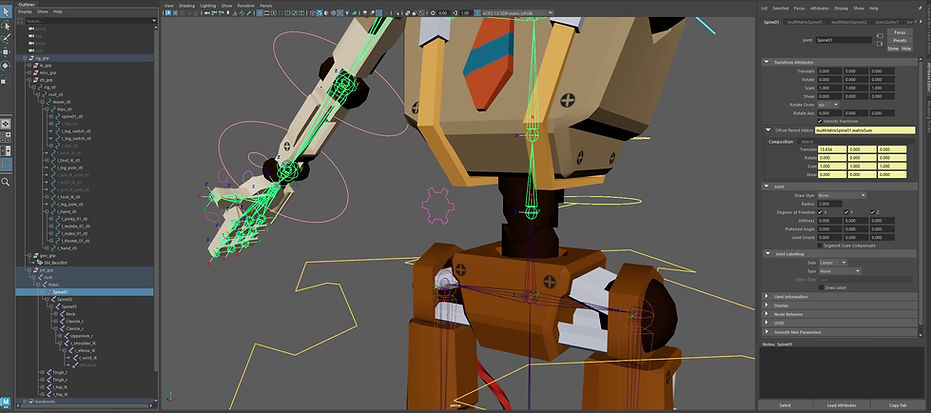
Instead of controlling transform attributes, I'm now working with the direct matrix of the joint. This is where the controller behaviors will feed into. The goal is to keep the joints perfectly zero so the rig stays clean and prevents potential issues.
In the selected spine joint, the numbers in yellow show the offset parent matrix numbers.

The spine is where I have my first use of matrix math to connect controllers to joints. I want the joints to follow the controllers in world space. To do this, I connected the world matrix of the controller and multiply it by the parent inverse matrix of the parent joint, the pelvis. Let's take a look at the 3 numbers we're working with for this problem.
1) Local Matrix: The offset the spine joint has from the pelvis (X axis: 13.634)
2) Parent Matrix: The position of the parent being the new "center/zero" for the spine joint (parent mtx)
3) World Matrix: The world position of the controller & joint
If you connect just the controller world matrix to the parent offset mtx, you are essentially combining both the world and parent matrices, causing the joint to fly off into space. The spine joint is following the world matrix, but the "world zero" is the parent, which is a problem. This is where the parent inverse matrix cancels out that problem by taking out the parent mtx. This then "returns" the spine joint's world zero to the actual world zero. Lastly, make sure the controllers and joints follow the same hierarchy, so then the local position of the joint is accounted for.
Spine made up of simple FK connections
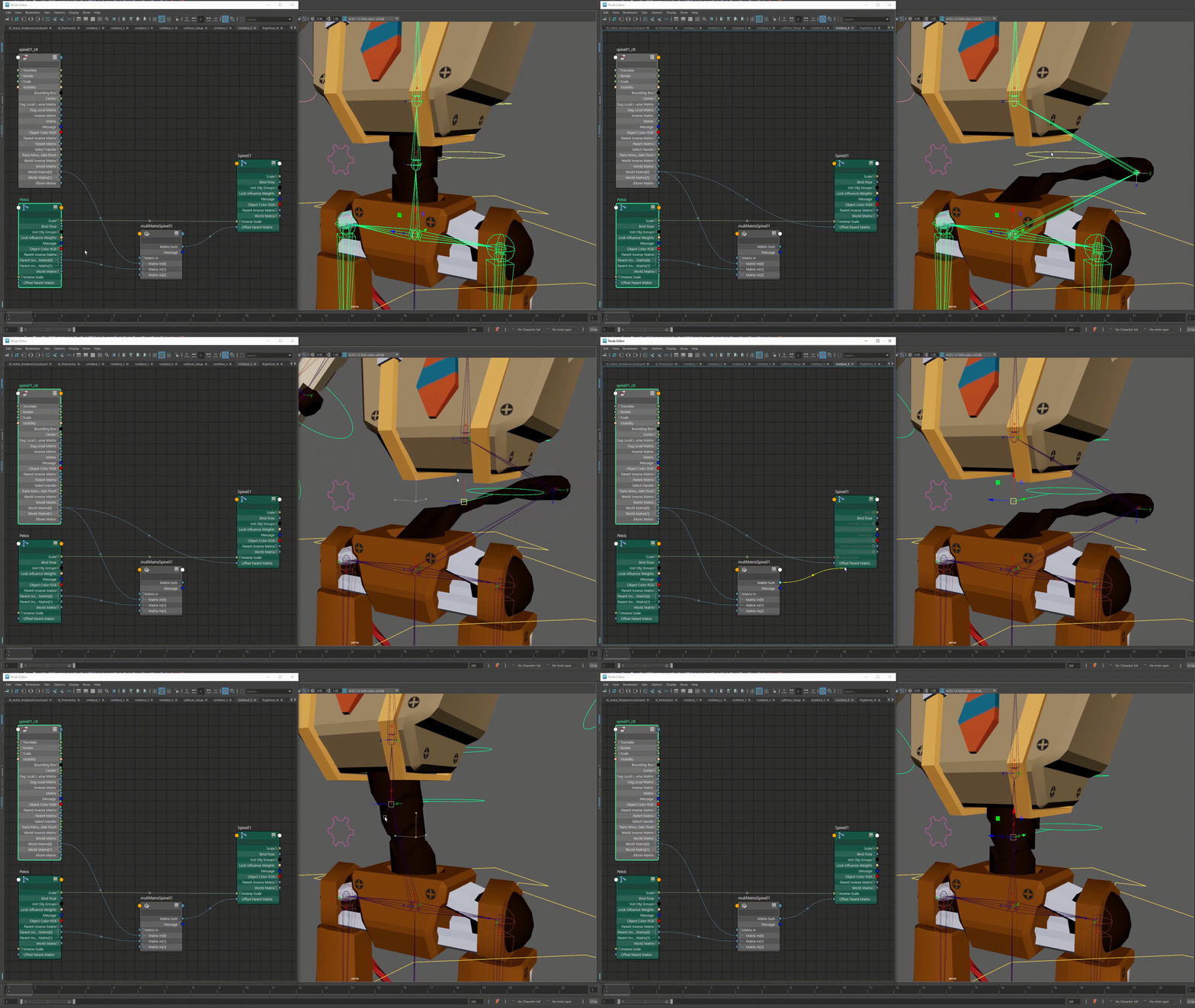
The parent inverse matrix of the prior joint is the offset needed to keep the controlled joint in the correct position
This practice of connecting a matrix to follow and a matrix to cancel out the issues is what I carried throughout the rest of the rigging process, as each part of the set up is basically the same thing. The problem is always finding out how to cancel out a number so the object is in the desired position.
Finishing The Rig
Moving forward with the rig, there were a couple of behaviors I wanted to set up that were beyond simply following a controller. For example, I decided to use a blend matrix for the IK/ FK switches in the arms and legs. This showed me the basics of space switching with matrix math.

IK/ FK switch using multMatrix and blendMatrix nodes
I unfortunately did not have enough time to create an IK solver myself so I still used Maya's built in solver, but I was able to support it with matrix nodes though. This is where I got to figure out how to use and obtain numbers for holdMatrix nodes, as they are crucial correctional nodes for spatial issues. An example of this is getting the IK pole vector to point towards the IK arm pole vector controller. I hooked up the controller world matrix and a hold matrix together. The hold matrix was a correctional node that set the pole to aim at the controller, and the world matrix is what moved that point in space. Like before, this was another instance of canceling out a number.

Matrix nodes connecting to IK solver
The resulting rig was a success! After completing the basic robot rig, I used this same method to rig the other robot enemy in the game, the "Security Bot", as well as the first person hands rig. In all, the rigs were controlled entirely with matrix math nodes, had no offset groups in the outliner, were animation ready, and were game engine ready. Animating the rigs was also very easy due to the stability of the rig structure and the speediness of the rigs. I never experienced any lag or performance hits when animating my characters, nor did I experience any issues with referencing rigs or exporting to Unreal Engine 5. Everything was fast and easy!
Understanding
So what is the point of rigging this way? The short way to say it is that it results in rigs that run faster and don't have as large of file sizes. Why does this happen though?
Maya's legacy tools, like parent constraints, are processing much more under the hood than a multMatrix node. Constraints are operating with many more attributes and solvers to achieve the desired result, making this 1 node essentially a bundle of math operations. The larger node requires more of the CPU in order to process it, making it slower. On the other hand, a multMatrix node is simply passing only the math that is being specified. It has no other attributes that throttle performance or use CPU power, making this node faster to evaluate.
In the example below, I show a connection between a controller and joint, and how the different nodes compare to each other.
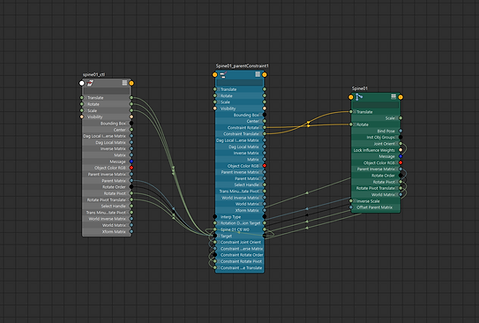
Parent constraint node connection has more attributes and cycles

multMatrix node connection has less attributes and no cycles
On a small scale this difference doesn't present much of an issue. When a character rig is scaled up to have hundreds of different connections though, that is where the difference is felt. The great part about matrix math nodes is they are more oriented towards parallel evaluation & multithreading, which means that CPU power can be distributed more evenly around many different nodes. This is great for rigs to have, as it means more nodes can be processed in a shorter amount of time. Older legacy nodes kill performance because they bottleneck CPU usage by forcing it to use more power to process different nodes.
Matrix nodes = Faster to evaluate, more can be processed at the same time. Parallel evaluation friendly.
Legacy nodes = Slower to evaluate, less can be processed at the same time. Non parallel evaluation friendly.
Another aspect to note is that a lot of constraint nodes use cycles, which is a huge killer for performance. Cycles cause serialization in Maya which means that the nodes are forced to be processed one by one instead of all at the same time. A cycle is much slower because Maya has to stop to process it and "break" the cycle so evaluation can continue. Cycles are also a sign of heavy dependencies, as it means that the node is depending on attributes of multiple nodes so it can be evaluated. The matrix nodes have no cycles and are generally stateless, meaning that Maya doesn't have to stop for that node and it isn't too heavily reliant on multiple other nodes, just the one that is routing math into it.
A huge difference in these 2 types of nodes is how user friendly the setup is with them. Older legacy nodes are more easy to use and come packed with many built in features to make setup faster. Newer math nodes take more time to set up because they require more user input and routing.

Parent constraint user options and customizable attributes (many more off screen)

multMatrix only has 2 extra attributes to go with the inputs
The left side shows how a parent constraint is set up. The user is given an easy button to press and plenty of options to make it work for their needs. Along with the setup, there are loads of customizable attributes to tweak. In an easy situation, the user just needs to select the controller, select the joint, and hit the button. A multMatrix node barely has any extra attributes for the node. The main function of the node is to process the math of the specific inputs and output that result. There is no default button to make this type of connection and no type of hint in the main Maya window. The user needs to specify which matrix outputs to plug in and in what order.
At first this makes learning matrix connections challenging, but I then found that it was actually a massive advantage. Less attributes also means less things that can go wrong, troubleshooting then becomes much faster because of how easy it is to identify the specific issue in a node network.

Bind joint switch with legacy nodes, more connections

Bind joint switch with matrix nodes, less connections
Another added benefit of doing the math myself is that it is easier to set up my own customized behaviors. For example, my IK/ FK arm switch felt easier to set up since I was in charge of each connection and not trying to wrangle any predetermined clutter.
For this project I didn't get to dive as deep as I wanted since I was working with a time constraint to get rigs done for our game. This project was an excellent opportunity for getting into the basics and making something with it though, and I'm very happy with what I achieved and learned. After I created this rig and graduated from VFS, I got to spend a lot of time studying matrix math in Maya and as a result I've been making more projects with what I've learned. I've written another article on my current projects and in it, I go into more detail about the usefulness of matrix math rigging and why/ how it performs better. The link to the article can be found at the bottom of this one in the "Hybrid Matrix Ribbon Rig" break down.
Animation & Exporting
As the character tech artist on the team, I was happy that I got to use my rig from an animation perspective. Animating this character was a blast! I never experienced any lag in the viewport or any issues that completely prevented me from continuing to work. In total, I got to animate over 60 animations for the robots and the player character.
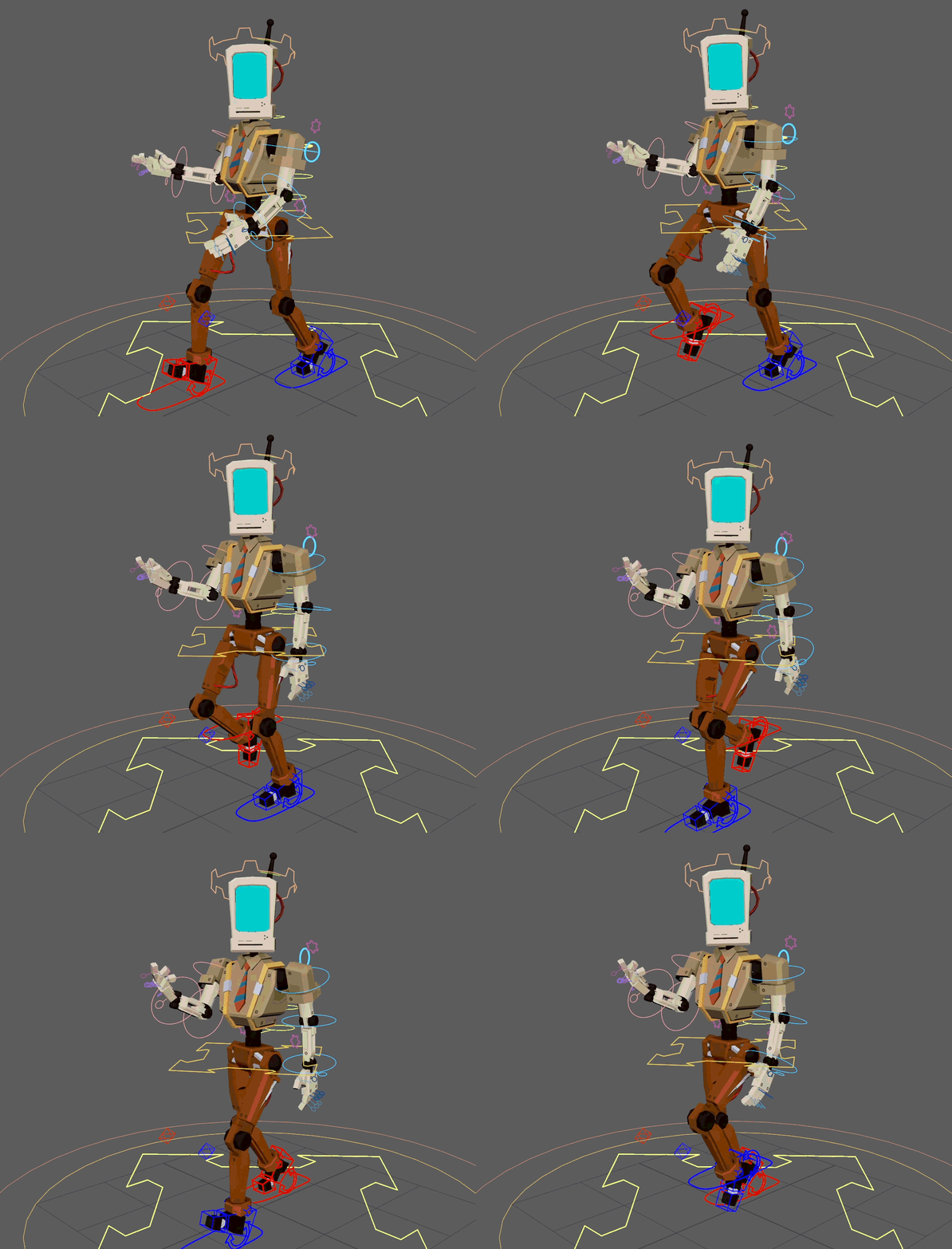
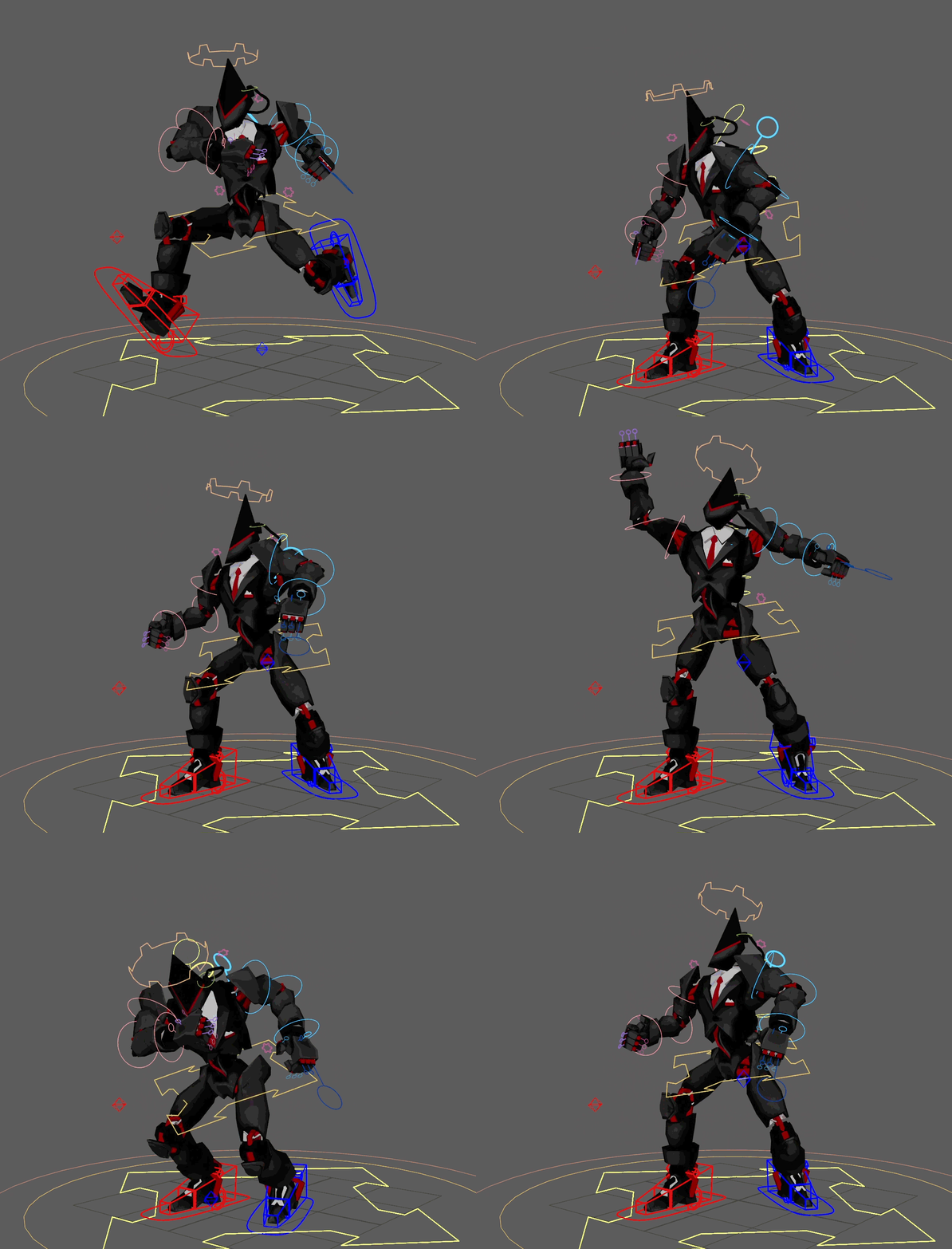
The next step was to export the characters and animations into Unreal Engine. I ensured all rigs were compliant with UE 5.6 and exported everything as FBX files. I also wanted animations to be shared across characters and not limited. Setting up the skeletons in UE to share animations was an easy process as both skeletons already had the same names and hierarchies.
In Unreal, I set each skeleton as compatible with the other, and I also set the Translation Retargeting options to "Animation Relative". This simple setup allowed for animations to be shared without having to create an extra retargeted animation.
Going for a stroll
Ending your stroll
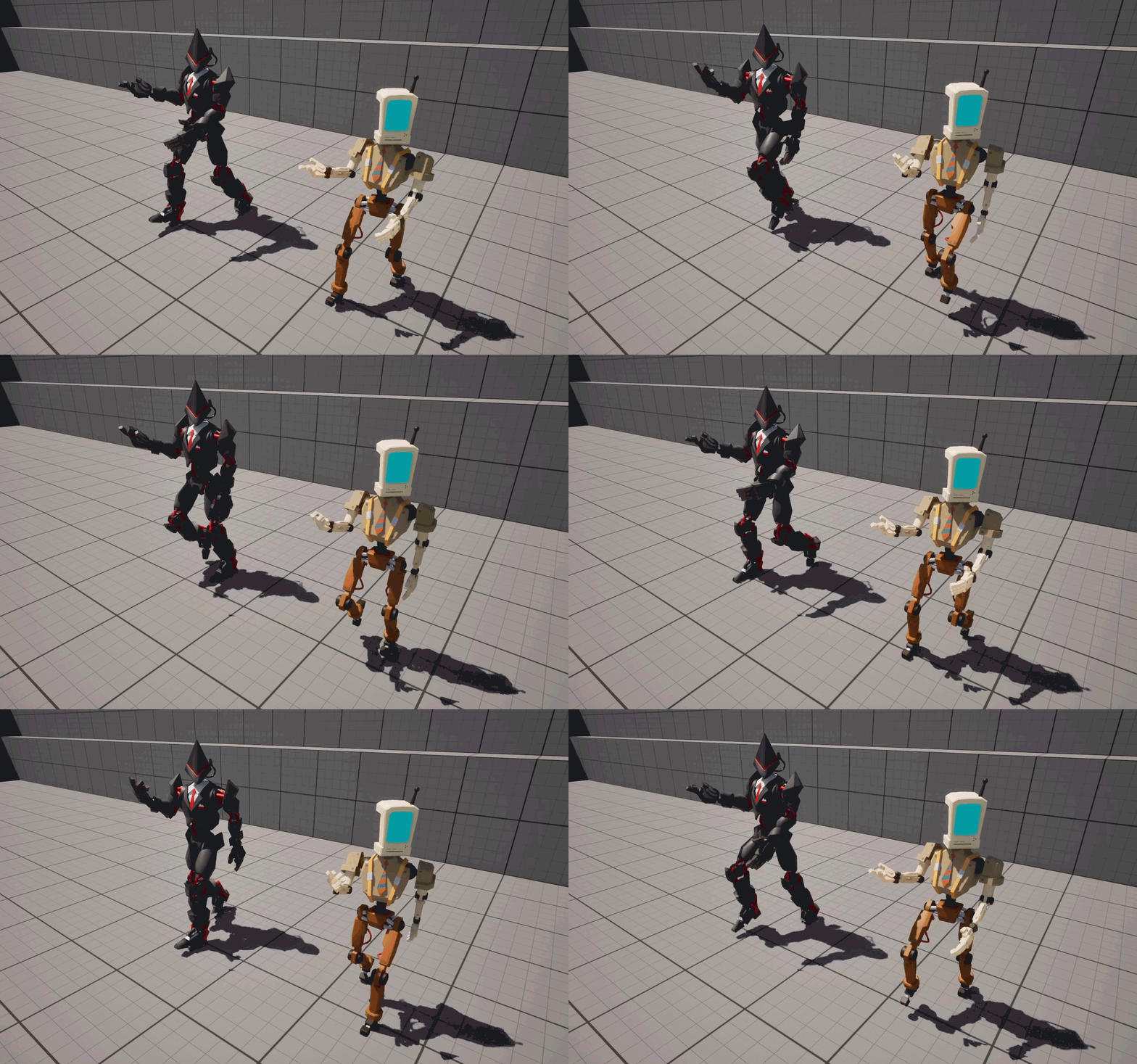
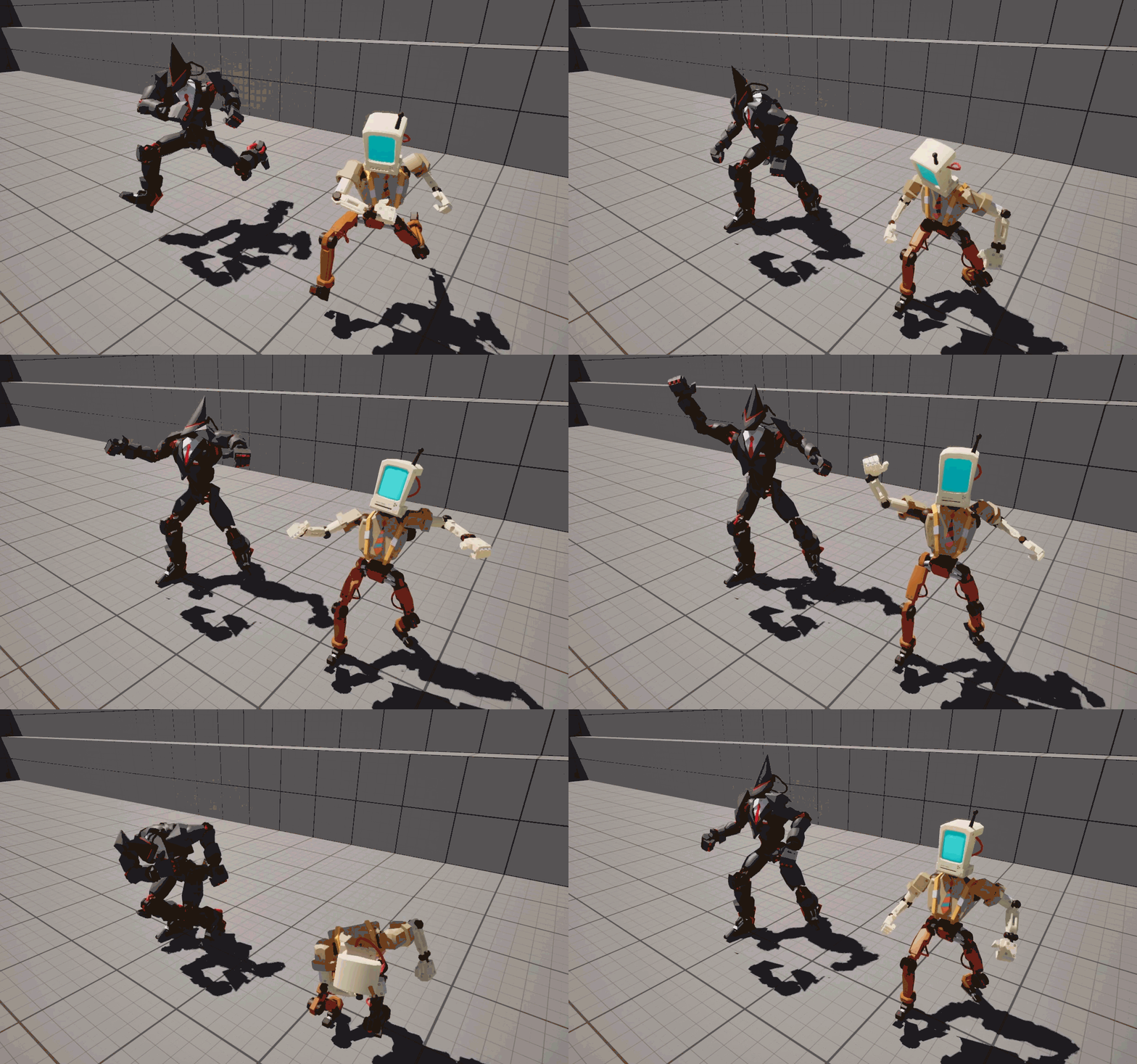
Both robots using an animation from the worker bot
Both robots using an animation from the security bot
Closing
With the game being completed, I can happily say I achieved my goals of rigging the characters with matrix math, understanding the usefulness of it, and using them for our game. This rigging process required a lot of intentional planning instead of blindly using tools, and I feel like a much better rigger because of it. I now understand how to approach math issues and I'm comfortable with the math nodes enough to build my own tools. While the characters were simple, I can easily see how in much more complex rigs, this rigging approach would be necessary for performance.
To recap everything I learned with matrix math:
1) How to connect joints to controllers
2) Creating FK chains
3) Supporting IK chains
4) Blending between IK & FK (space switching)
5) Matrix problem solving
This rig was a huge milestone for me! I had never gone this deep into rigging, this process was entirely new to me. I'm already looking forward to my upcoming projects where I get to learn the aspects I didn't have time to learn like creating my own IK solver, creating ribbons, and the various matrix nodes I didn't get around to using.
I would like to thank the entire team that worked on the game Rage Quit, and if you haven't played our game yet, we would love if you checked it out and leave a review.
Play Rage Quit here:


Hybrid Matrix Ribbon Rig
Learn how I recreated a traditional ribbon rig in Maya using a hybrid of matrix math and NURBS.

Smear Frame Hammer Rig
Learn how I created a game ready first person rig in Maya that utilized smear frames in animation without any special programming needed in Unreal Engine.
bottom of page